Panda X Panel Storage and Performance Tips
Panel apps are small, but they live inside a whole phone system, and that system's health decides how smoothly everything feels. When storage is nearly full, memory is crowded and dozens of apps compete in the background, even a lightweight tool can seem slow. The good news is that the fixes are ordinary phone habits, well within any user's reach.
This guide explains how storage, memory and background activity affect Panda X Panel, and gives a simple maintenance rhythm that keeps the app responsive. Nothing here requires technical knowledge or extra software. It is the same care that benefits every app on your phone, organised around the problems panel users actually report.
Why Free Storage Matters So Much
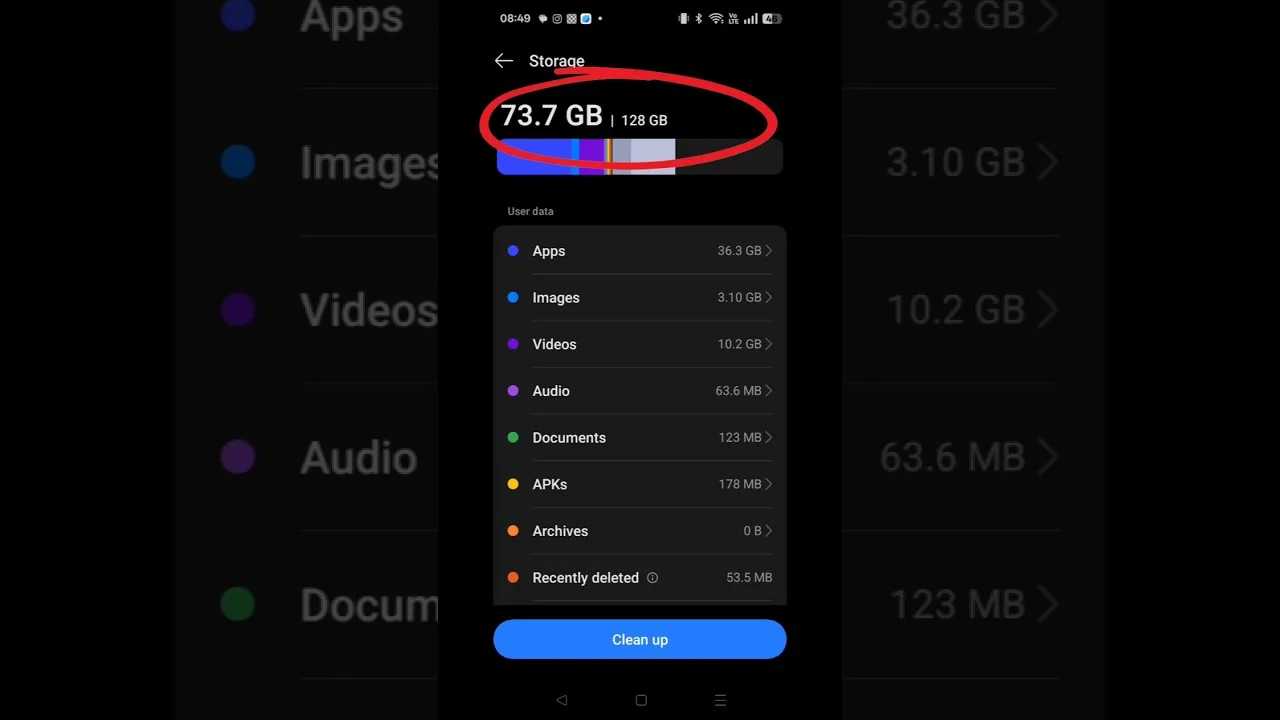
Android needs working room. When internal storage drops to its last few percent, the system struggles to write temporary files, updates stall, and general responsiveness falls across the whole device. Users often blame whichever app they were using when they noticed, but the real cause is a phone gasping for space underneath everything at once.
Keep a comfortable margin free, ideally several gigabytes on a typical device. Large videos, forgotten downloads and duplicated photos are the usual occupants, and an occasional tidy-up reclaims surprising amounts. The guidance on Panda X Panel Android tool sets the broader context for device expectations, and storage headroom is the simplest of those expectations for any user to meet.
Cache: What It Is and When to Clear It
Apps store temporary files, called cache, to avoid rebuilding the same data repeatedly, which normally speeds things up. Cache becomes a problem only occasionally, when old temporary files clash with a newer app version and cause odd behaviour. In that specific situation, clearing the app's cache from system settings is a safe first step that does not remove your settings.
Clearing cache is not a daily ritual worth performing. Done constantly, it actually slows apps down, because everything must be rebuilt from scratch each time. Reserve it for genuine odd behaviour after an update or a long period of use, and treat it as one step in a calm troubleshooting sequence rather than a general performance tonic.
Background Apps and Memory Pressure
Every app left running in the background holds some memory and occasionally wakes to work. On phones with generous memory this hardly matters, but on modest devices a crowd of background apps leaves little room for the game and panel working together. Closing what you genuinely do not need before a session is simple, free and immediately effective.
The related advice in Panda X Panel tips for low-end phones develops this theme for budget hardware in more detail. Even on stronger phones, the habit helps during long sessions, because it reduces the random interruptions and sudden slowdowns that come from other apps choosing the worst possible moment to sync, update or scan in the background.
A Simple Monthly Maintenance Rhythm
Good performance is mostly rhythm, not heroics. Once a month, restart the phone, review storage and remove what you no longer need, check for app and system updates at a calm moment, and glance through your installed apps for anything forgotten. This short routine prevents the slow build-up of clutter that turns a healthy phone sluggish over a year.
Pair that rhythm with the expectations in the device compatibility guide for Panda X Panel, which explains how device class affects what smooth actually means. A well-kept older phone often feels better than a neglected new one, because performance in daily life is as much about maintenance as about specifications printed on a box.
Judging Performance Fairly
Measure performance by consistent feel across several sessions, not by one rough evening. Networks fluctuate, phones warm up, and other apps misbehave, all of which can make a healthy setup look guilty. Change one thing, observe over a few days, and keep notes if problems persist, because patterns in those notes point to real causes far better than impressions do.
If the app itself develops genuine faults, freezes, crashes or missing menus, that is a different category from general sluggishness and deserves direct troubleshooting steps. Keep the two categories separate in your mind: system sluggishness responds to maintenance, while app faults respond to targeted fixes, and confusing them leads users to apply the wrong remedy repeatedly.
One more quiet performance factor is the age and health of the phone itself. Batteries degrade, storage fills with years of accumulated files, and systems that were once snappy slow under the weight of everything installed since. A panel app cannot reverse that history, but the maintenance rhythm in this guide measurably slows the decline. If your device is several years old, consider a deeper tidy once a year: back up your photos, remove entire categories of clutter, and review every installed app honestly. Users are often surprised how much of an old phone's original responsiveness returns after that kind of clearing, and the panel benefits along with everything else you run daily. Treat that yearly clearing as a reset for the whole device, and you will feel the difference in every session that follows it for months afterwards.
Final Thoughts
A responsive Panda X Panel experience rests on a healthy phone: comfortable free storage, sensible cache care, background discipline and a light monthly routine. None of it is glamorous, and all of it works. Build those habits and the app will feel as light as it was designed to be, session after session, on the phone you already own.